
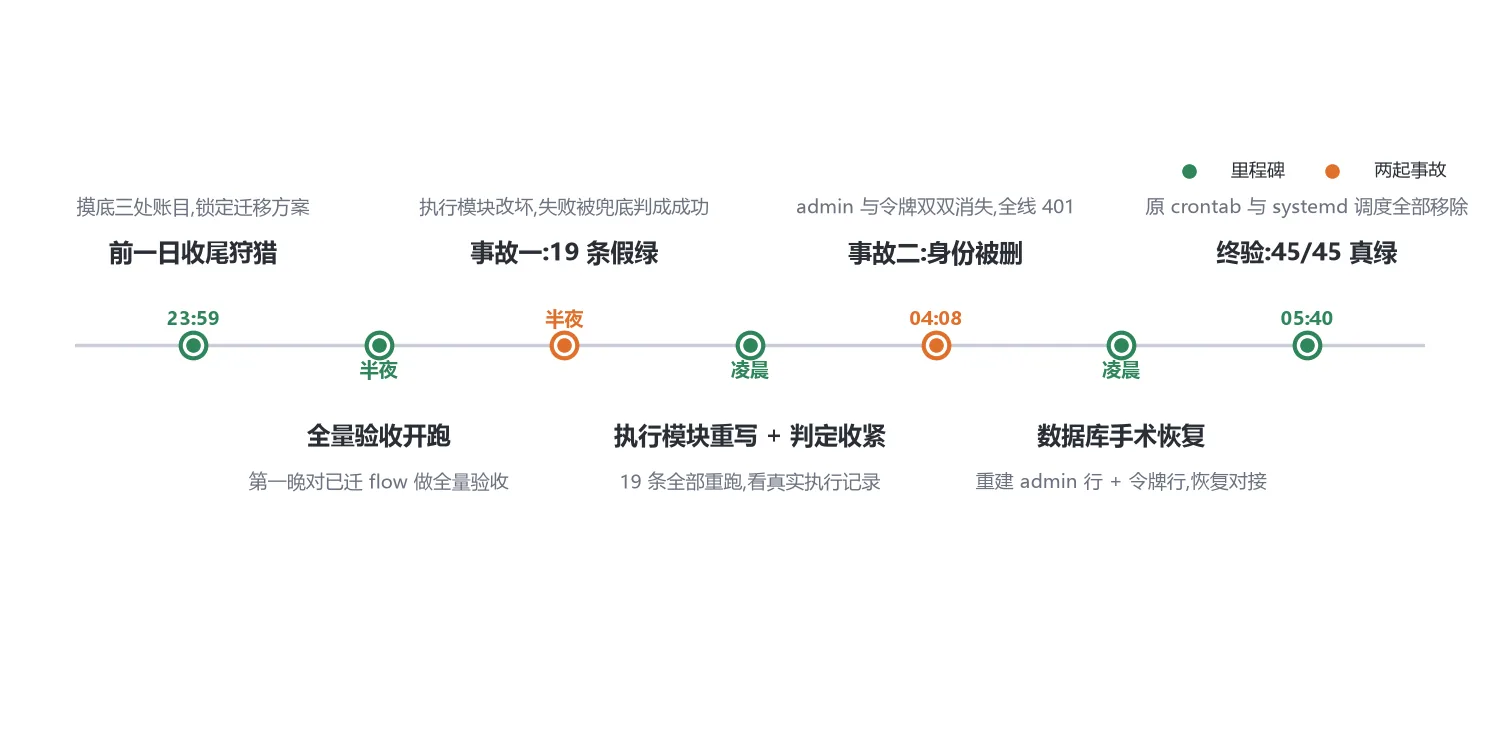
45 scheduled jobs. 25 sitting in crontab, 18 hung on user-level systemd timers, and 2 more are pilot and split-slot tasks still attached to the original cron. At 05:40 on 2026-08-24, I migrated all of them into our self-hosted Windmill—45/45 passed smoke tests green, original schedulers all removed.
If I had done this earlier, I would have saved a lot of midnight log-diving. But the further I got into it, the more I realized the migration itself had more landmines than cron ever did.
1. Why clear out this mess
These 45 jobs never had any proper ledger. They were scattered across three places:
- 25 lines in crontab, bare-bones format with zero history; no rollback when mistakes were made, no recycle bin when things were deleted;
- 18 systemd timers, spread across
~/.config/systemd/user/, each one needing alist-timersto find out if it was still alive; - Frequencies ranging from every minute to the first Sunday of each month, and some jobs no one remembered who added or why.
The worst part was invisibility on failure: a cron job could silently break, no alerts, no dashboard, and you might not discover that a dataset had been stale for a month.
I only had three demands for this mess: visible, editable, and auditable. Self-hosted Windmill CE ticked all three—web UI, editable flows, failure alerts. But before we could land it, there was a physical problem to solve: Windmill flows run inside Docker containers and cannot touch the host’s crontab scripts, nor execute any commands on the host machine.

2. Core architecture: a “mailbox protocol” bridge
The solution was to separate execution from scheduling: scheduling and flow definitions stay in Windmill, while the actual command execution still happens on the host. The middle ground is Windmill’s built-in variables, acting as a mailbox, with a host-side daemon as the postman:
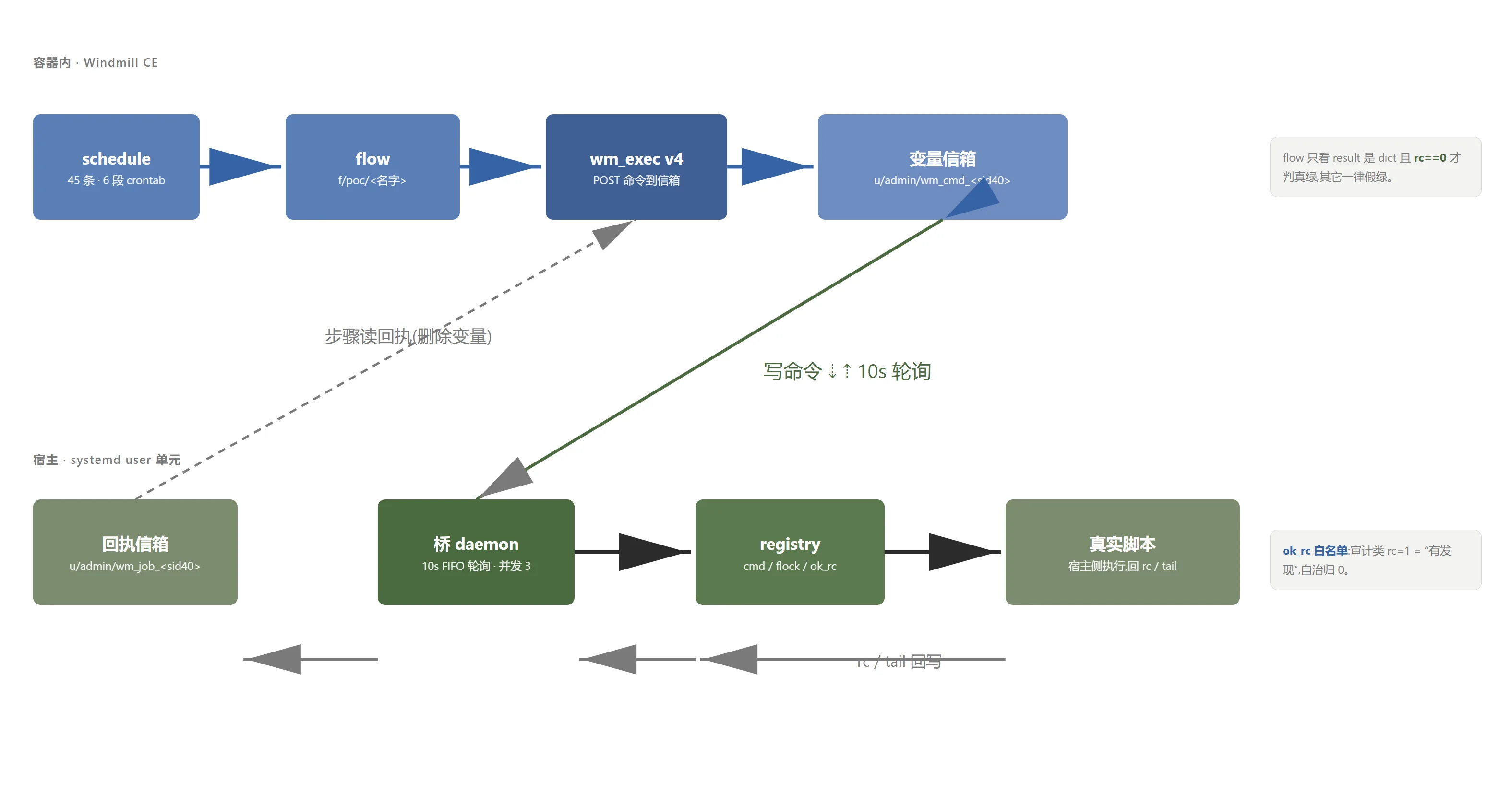
Here’s how it works:
- A Windmill schedule, using crontab syntax, triggers a flow on time;
- The single step in the flow,
wm_exec(a tiny module I wrote), POSTs the command to be executed as a mailbox variable namedu/admin/wm_cmd_<jobID>; - The host-side bridge daemon (a systemd user unit, running persistently since boot) polls the mailbox every 10 seconds, picks up commands in FIFO order, and executes them via native shell according to a registry (command, working directory, lock file, timeout, allowlist);
- After execution, it writes the
rcand output tail into the receipt mailboxu/admin/wm_job_<jobID>; the flow reads it and deletes the variable itself. Done.
A few key details:
- Variable inboxes are naturally atomic: creating a command in a variable has no “overwrite race” problem; they naturally serve as a queue;
- Variables must be deleted via HTTP DELETE with the
/w/admins/prefix, otherwise the command variable lingers and the bridge replays it every 10 seconds; - The bridge has only 3 concurrent slots; when a long-running job occupies one, other jobs must wait—this limitation later forced me to redesign the approach for one special job (see Section 5);
- Each script also has an
ok_rcallowlist: for audit-scanning scripts,rc=1means “findings detected,” which is not a failure and is automatically normalized to 0.
3. The iron rule: only “true green” counts as migrated
During the migration I set myself one iron rule: if the smoke test isn’t truly green, don’t delete the original cron or timer. The definition of “true green” was strict—the flow had to produce a result that was a dictionary with rc == 0, and the tail (output tail) had to contain the actual script output.
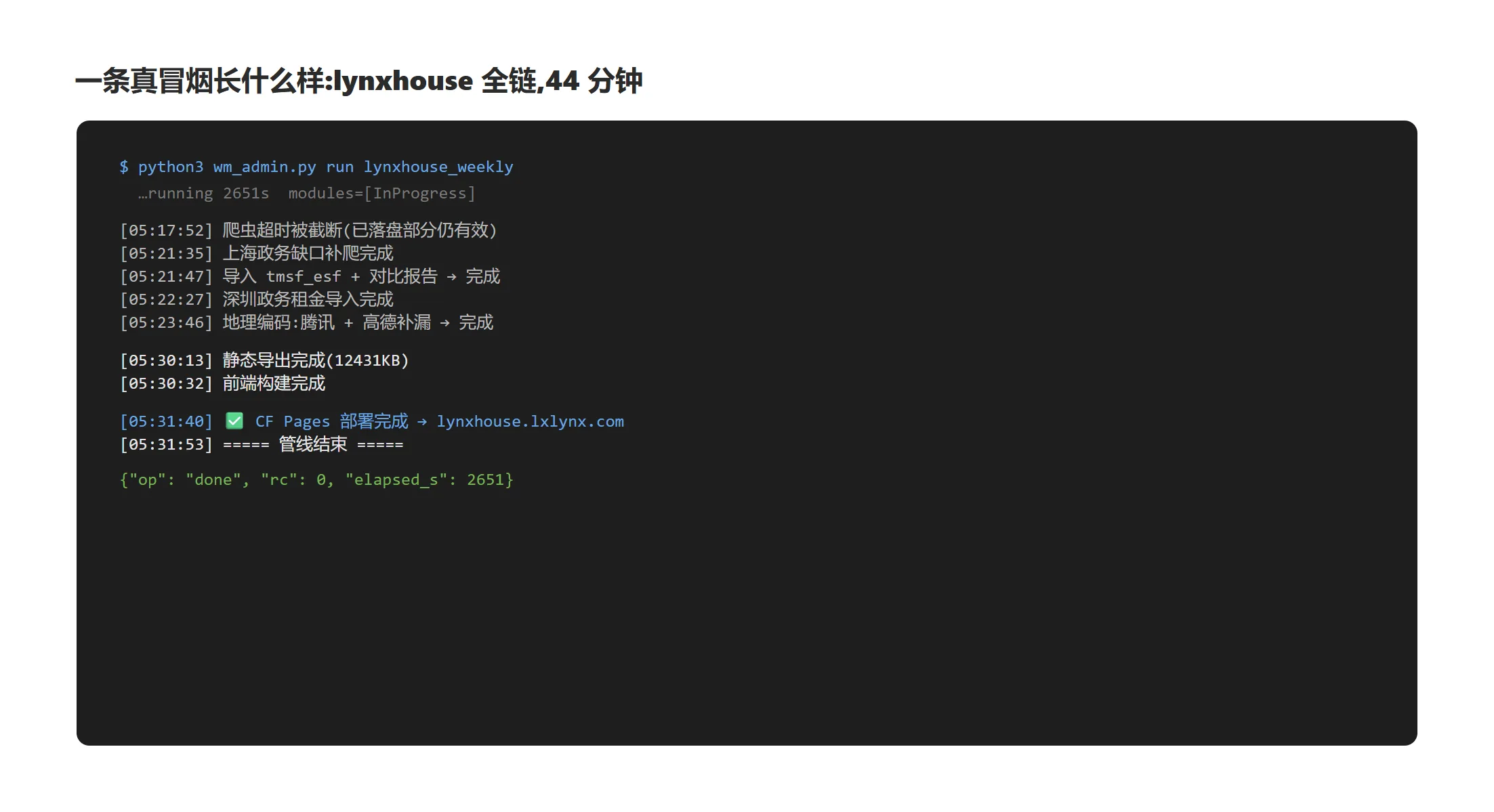
Why so strict? Because if you relax the success criteria even a little, your migration becomes an illusion. The incidents described in the next section are proof.
4. First incident: failures could be classified as successes
On the first night of migration, I was running a full acceptance check at midnight and discovered that some flows showed as “migrated,” yet not a single job had actually executed on the host.
After investigation, the execution module had been broken in a previous revision: the dispatch path in the flow pointed inside the container, so every command dispatch必定 failed. But after the failure, the flow’s failure-handling fallback module would exit with code 0 and return the string “alert dispatched” as a success signal. The acceptance driver, seeing “success,” checked the box—19 fake greens were born this way.
The fix involved two things: rewriting the execution module to the mailbox protocol, and tightening the success criterion to result is a dict and rc == 0. Then all 19 were re-run, and this time I verified against the actual execution records in the job table.
The lesson is朴素: success must be a single, strict signal—not a string. Any “close enough” fallback will turn into a fake handover list at midnight.
5. Second incident: at 4 AM, my identity was deleted
Worse than the fake greens was the morning of day two, at 04:08. The bridge daemon suddenly started getting 401s across the board. My admin token and the admin user had both been deleted from the database’s token and user tables. The audit table was spotless—not a single record explained who deleted them or through what path.
The bridge was connected to a completely瘫痪 API at the time. The recovery required database surgery: rebuild the admin user row, recreate a token row, and satisfy the hidden rules of the token table—
- The table’s
token_hashstores the sha256 hex of the original token, not the token itself; - Authentication queries require the token row to simultaneously satisfy
owner = 'u/admin'(the project ID format withu/prefix) and a non-empty email field. Get either one wrong and you’re permanently 401’d.
I figured out these rules by reading through the auth source code line by line. After recovery, I persisted the token renewal date and backup path into the handover doc and flagged this single point of failure as “needs auditing.”
The lesson for self-hosting enthusiasts: don’t treat the scheduler’s own account as something that will never break. It’s infrastructure, just like your crontab, and deserves the same backup and audit treatment.
6. Third incident: long-running processes aren’t “jobs”
The most stubborn one was ghwebfollow: a Playwright-driven GitHub follow engine, running while True from boot until the heat death of the universe—it never has a “complete” concept.
Migrating it as a regular job into Windmill would fail twice:
- The bridge gives it a 900-second timeout; when that fires, it’s judged as failed—a healthy engine, killed for living too long;
- The scheduler fires every 10 minutes. The previous 15-minute instance is still alive when the next one starts queuing—the 3 concurrent slots get consumed by the same job in no time, and every other flow starves.
The correct solution was to think through the semantics: the original systemd timer was never “run every 10 minutes”; it was “check every 10 minutes and restart if dead”—a watchdog gate. So I paired the engine with a guard script: Windmill fires every 10 minutes, and the guard checks—
- Engine is alive and heartbeat is fresh → do nothing, exit rc=0 immediately;
- Engine is dead or heartbeat is stale → launch a new engine, rc=0.
Each inspection completes within 5 seconds and never occupies a slot. What doesn’t finish is a service, not a job; services need watchdog-style polling, not being stuffed into a job queue.
7. Fourth incident: a 1GB container can kill itself
During the WeChat draft job migration, smoke tests failed three times in a row, all with exit code 137. Exit code 137 means the process was killed by signal 9—in a container, that almost always means the cgroup memory limit throttled it.
Checking the host kernel logs confirmed it: the job was a Hugo build generating a static site from three articles, and the process memory peak hit 1.16 GiB while building, but the container’s mem_limit was only 1g. The build’s own memory demand exceeded the limit the container set for itself. Raising mem_limit to 3g made the smoke test green immediately, and the three drafts were genuinely produced in 422 seconds.
This lesson is the most actionable of all: when a migration smoke test returns rc=137, check the memory limit first, don’t immediately suspect the migration logic. 137 is telling you “I died, but not of natural causes.”
8. The fifth incident, plus a handful of small pitfalls
The fifth incident was actually three things, each unremarkable but all genuinely eating my time:
Dead ports in the proxy candidate list. An auto-updating script picks available proxies from multiple local candidates, and the first entry in the list was a port that had been dead for ages. Every execution would hit the dead port first before falling back—slow, but no error. During migration troubleshooting, I initially suspected it was a git issue, when the real problem was sorting order: live ports first, dead ports last.
Parallel cron line deletion trampling each other. Multiple parallel migrations each read crontab, deleted their own line, and wrote back—later writers would resurrect the lines written by earlier ones. Three cron entries were resurrected this way. Lesson: crontab read-modify-write must be serialized.
The cron Sunday trap. Windmill’s crontab syntax starts with seconds, for a total of six fields; Sunday must be written as 7, not 0. The migration tool had no such conversion, and a monthly job would be outright rejected with an error.
One more troubleshooting tip worth noting: a bridge log was full of errors, and after checking for a long time, I discovered the log file itself was a fossil from five days ago—after the bridge switched its output to journal, nobody deleted the old file. Always confirm you’re reading live logs before troubleshooting; this alone was worth half an hour.
9. What it looks like now
Migration end state:
- All 45 jobs are truly green and enabled, with frequencies from every minute to the first Sunday of each month, all visible in the web UI and on a single ledger;
- The original crontab retains only 6 entries that I intentionally did not migrate—watchdog (self-healing health-check) tasks tightly bound to the system, which belong on the host;
- Both incidents (fake greens, deleted token) are fixed and documented in the handover doc;
- Two open items remain: 9 dead containers pending confirmation for cleanup; the admin token expires on 2026-09-22, renewal reminder posted in the doc.
If you also have a scatter of cron jobs, whether to act on it is another question—but this migration offers a reusable decision framework:
- Build a running ledger first, then migrate: all 45 jobs were inventory’d before any migration began. Tasks swim on their own; don’t flail in the mud.
- Accept only rc==0 plus real output as success—never a string masquerading as success;
- Layer first, then act: jobs that run and exit? Migrate them directly. Services that run forever? Add a watchdog poll and migrate that. Self-healing watchdogs? Leave them on the host.
- Deleting the original scheduler is the last step—only act when everything is green, and keep a rollback path for every single job.
Scheduled jobs are infrastructure, not desk-scrap files. They deserve a web UI, a ledger, and a set of alerts that actually ring.