
Core Announcement: SCM Open-Sourced with Homebrew Support
SCM (Search Computer Memory), a local-first AI search tool for macOS media, is now open-source and available via Homebrew. Designed for Apple Silicon Macs running macOS 12+, the project uses Bun as its package manager and Electron for packaging. All inference runs locally—zero accounts, no uploads, and full offline operation after initial model download. Key facts:
- Installation: Homebrew Cask (
brew install --cask allenv0/scm/scm); - Initial downloads: CLIP base model ~435MB; Whisper tiny.en ~150MB or base.en ~300MB for transcription;
- OCR packs: English included; 36 languages supported (default includes English; additional languages可按需启用, ~2.4–5MB each);
- Run commands:
bun run devfor development;bun run distfor installer build; - Source: GitHub (https://github.com/allenv0/SCM)
Multi-Modal Search: Vision, Text, and Speech
SCM offers four independent search modes, each optimized for specific content types:
- Visual Semantic Search: Local ONNX models (e.g., CLIP) generate image embeddings; natural-language queries score via cosine similarity with gated phrase/filename boosts and near-duplicate filtering. CJK queries use bigram overlap for better recall (e.g., “台北車站” matches both “台北” and “車站”).
- OCR Text Search: Tesseract-based extraction stores word boxes for highlighting; robust to fractured addresses (e.g.,
[at],gmail,com), TLD splits, and dictated formats (“at” vs “@”, “dot” vs “.”). No visual model required—works while AI engine is offline. - Whisper Dialogue Search: Utterance-level transcripts enable three retrieval tiers: Exact Line (contiguous), Exact Words (single utterance or ≤8s window), and Words Spoken (anywhere in video). Clicking a result seeks directly to that timestamp.
- Scene-Level Video Search: ffmpeg detects shot boundaries; segments embed midpoint frames with poster thumbnails. A noise gate filters gibberish matches; each video contributes at most 3 scenes.
An unexpected design tradeoff: OCR and speech search operate independently of visual models, ensuring baseline functionality remains available even when AI inference is warming up or disabled.
System Capabilities: Auto-Maintained Library & Smart Views
The tool emphasizes user control and privacy:
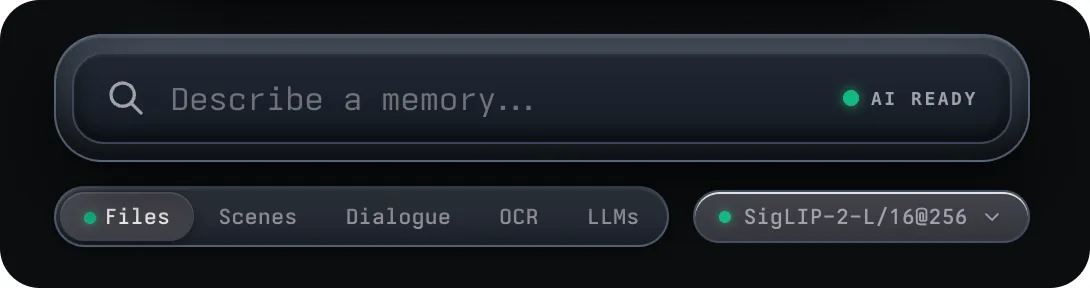
- Smart Tab System: Built-in views (All/Videos/Screenshots/Email); Screenshots/Email toggleable in Settings. Saved queries (up to 20) are renamable and persist state (prompt + mode: Files/Scenes/OCR/Dialogue).
- Rename-Proof Screenshot Classification: Four-tier signal system: 1) Manual override (right-click), 2) Filename vocabulary (30+ localized OS names), 3) PNG/EXIF metadata probe (reads “screenshot” in user comment fields), 4) Source-folder context.
- Content-Hashed Deduplication & Watched Folders: SHA-256 inode-independent hashing; auto-watches imported folders with live fs.watch + launch-time resync. Retry logic capped at 3 attempts.
- Model Hot-Swap & Library Snapshots: Five ONNX models supported; switching triggers background re-embedding with keyword-only fallback. Up to 10 named embedding snapshots (index + bins + scene/transcript sidecars) for rollback or “Fresh Start” reset.
| Module | Default Size | One-time Download | Switch Behavior |
|---|---|---|---|
| CLIP (Vision) | ~435MB | Yes | Re-embeds library in background |
| Whisper tiny.en | ~150MB | Yes | Re-transcribes all videos |
| Whisper base.en | ~300MB | Yes | Re-transcribes all videos |
| OCR Language Pack | 2.4–5MB | Per-language | No reprocessing needed |
Local LLM Chat: RAG on Extracted Evidence
An optional llama.cpp sidecar (enable in Settings → LLMs Chat) answers questions from indexed evidence without联网:
- Sources: Dialogue lines, OCR text, filename keyword hits
- Corpus Narrowing:
/screenshots,/videos,/emailprefixes filter scope before model invocation - UX: Streaming tokens with real-time tok/s display; numbered citations are clickable
- Control: Stop button preserves partial answer; empty evidence short-circuits inference
This merges search results with summary generation, reducing context-switching for deep analysis workflows.
Who Should Try It—and Who Should Wait
Ideal for users with:
- Search-heavy workflows (snapshots, video interviews, email threads);
- Strict privacy requirements (no cloud trust assumptions);
- Video editing needs (exact dialogue line定位).
Delay until later if you:
- Use Intel Macs (Apple Silicon + macOS 12+ required);
- Manage huge libraries (>100GB videos) where indexing time matters;
- Rely on cross-device sync (no account system, fully local-only).
Final Notes
SCM represents a mature pivot in local AI: from isolated inference to persistent indexing, multi-modal retrieval, and private conversation. Its architecture—local First, opt-in intelligence, content-as-source-of-truth—demonstrates that privacy and capability can coexist. As ONNX Runtime and model efficiency improve, such tools may evolve into essential infrastructure for knowledge workers.