
October 17, Microsoft published a blog post inviting Windows Insider Program members on the Experimental Channel to test Windows 11 26H1 Preview Build 28120.3272, focusing on fixing a bug in a system audio component that caused some games and apps to crash, and adding a cursor indicator.
Quick facts:
- Version: Windows 11 26H1 Preview, Build 28120.3272
- Release channel: Experimental Channel, the more experimental branch of the Insider Program, where features are not guaranteed to reach the stable release
- Availability: available via Windows Update on the day the blog post was published, with changes rolling out in phases
- Main fix target: app crashes caused by the built-in system audio decoding component
- Target devices: 26H1 mainly targets Qualcomm Snapdragon X2 series ARM laptops (the primary target platform), as well as next-generation SoC devices such as NVIDIA N1X; these devices emphasize long battery life, low power consumption, and native NPU compute
- What’s new: cursor indicator; a simplified Search home interface that reduces visual clutter and makes it easier to quickly view recent searches
The source of the crash: a “hit-or-miss” decoding file
To understand what this fix addresses, we need to go back to early October. Microsoft confirmed at the time that the September 2026 optional update KB5124010 caused some apps and games that rely on the built-in system AC-3 (Dolby Digital) audio decoder to crash. AC-3 is a common multichannel audio encoding format, and the built-in decoder is responsible for converting such audio tracks into playable sound—the problem lies in the decoding step, not the apps themselves.
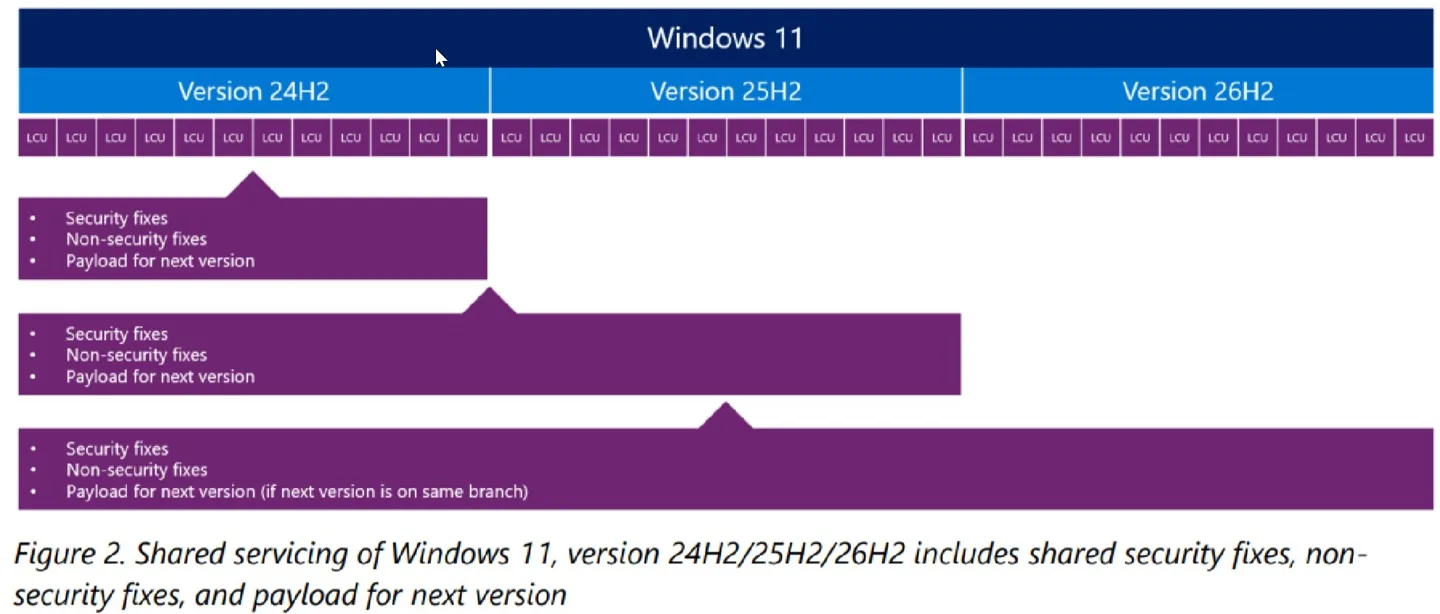
The issue affected Windows 11 24H2, 25H2, and 26H2, with symptoms varying by app behavior: some would not launch at all, some would suddenly close without warning, and others would crash during normal operation as soon as a decoding operation such as playing music was involved. The impact covered games, media players, and some productivity tools; most modern apps include their own audio decoders and do not rely on Windows built-in components, so they were unaffected.
There is one unexpected data point here: the msmpeg2ac3dec.dll that triggers the crash is located in the System32 and SysWOW64 directories, but not all Windows 11 devices have this file. According to BornCity, systems upgraded all the way from Windows 11 22H2 retain the component, while devices with a clean install of 24H2 or 25H2 do not have it and are therefore unaffected by this bug—on systems with the same version number, whether the problem occurs depends on the installation path. Some users triggered the component crash simply by playing multiple MP3 files at the same time.
Microsoft did not provide a dedicated workaround at the time. Users who depend on affected apps could remove KB5124010 via “Settings > Windows Update > Update history > Uninstall updates,” and temporarily pause Windows updates after removal to prevent the system from automatically reinstalling the patch before the fix rolls out.
September updates ran into one problem after another, while security fix volume surged
The audio crash was not an isolated event. KB5124008 on September 8 brought long-requested features such as a movable taskbar, a resizable Start menu, and Bing-free Windows Search, while fixing the largest number of security vulnerabilities in a single month in Microsoft history—jumping from 86 in September 2025 to 974 in September 2026. But along with the features and security fixes came a string of new problems.
| Date | Update | Details and follow-up issues |
|---|---|---|
| September 8 | KB5124008 | Movable taskbar, resizable Start menu, Bing-free Search; fixes 974 security vulnerabilities, but causes AMD Radeon GPU black screens and driver timeouts, Remote Desktop failures, File History unable to detect external drives, etc. |
| September 14 | KB5129195 (out-of-band) | Fixes Remote Desktop connections, Claude Cowork folder sharing, multichannel audio; audio issue only partially resolved, and introduces a new File History bug |
| September 22 | KB5124010 | Includes File History fix, but backup timestamps and file versions still do not update; confirmed to cause AC-3 decoding apps to crash |
| October 17 | Build 28120.3272 | 26H1 Experimental preview: fixes audio component crash, adds cursor indicator, simplifies Search home |
According to Windows Latest, KB5124008 also broke folder sharing for WSL and apps that use Linux VMs (such as Claude Cowork). The emergency update on September 14 fixed some of that, but its own new bug made File History display “No usable drive found” even when a backup drive was connected; KB5124010 on September 22 made the drive detectable again, but backup timestamps and file versions stopped updating, so backups were not truly restored.
Who should install it now, and who should wait
- Who should try it now: users already on the Experimental Channel who have a spare machine; gamers and content creators currently affected by the KB5124010 audio crash who are willing to take on preview-build risk; developers who want to evaluate the battery life and NPU capabilities of Snapdragon X2 or N1X platforms ahead of time can also use this build to see where 26H1 is headed.
- Who should wait: users still on stable releases 24H2/25H2/26H2 whose daily work depends on games or media players. They can uninstall KB5124010 and pause updates first, then wait for the fix to reach the stable channel; there is no need to switch to the Experimental Channel just for this one fix.
Final thoughts
An audio decoding regression has made this 26H1 fix preview attract more attention than the cursor indicator it brings. The fact that 974 security fixes and a chain of feature failures arrived in the same month shows that the tension between update cadence and validation depth remains unresolved. For ordinary users, waiting a few days before installing stable updates is still the easiest way to protect themselves right now.