
One Core Insight: Decoupling GUI from CAD Core Logic

LibreCAD, as an open-source 2D CAD application, demonstrates exceptional architectural clarity by cleanly separating the GUI layer from its CAD core functionality. When a user clicks the ‘Line’ tool button, the program does not immediately draw; instead, it traverses a complete middleware pipeline: QAction object -> ActionFactory -> LibreCAD’s internal RS_ActionXXX action classes -> EventHandler. This ensures maintainability and extensibility.
The full article traces the complete path from main() entry point to GraphicView initialization. A key fact is that a single QAction can be reused across multiple UI entry points— functioning as toolbarbutton, menu item, or keyboard shortcut—avoiding redundant GUI logic and showcasing the synergy between Qt framework design and LibreCAD’s custom architecture.
Two-Phase Transformation: From Qt QAction to LibreCAD Action
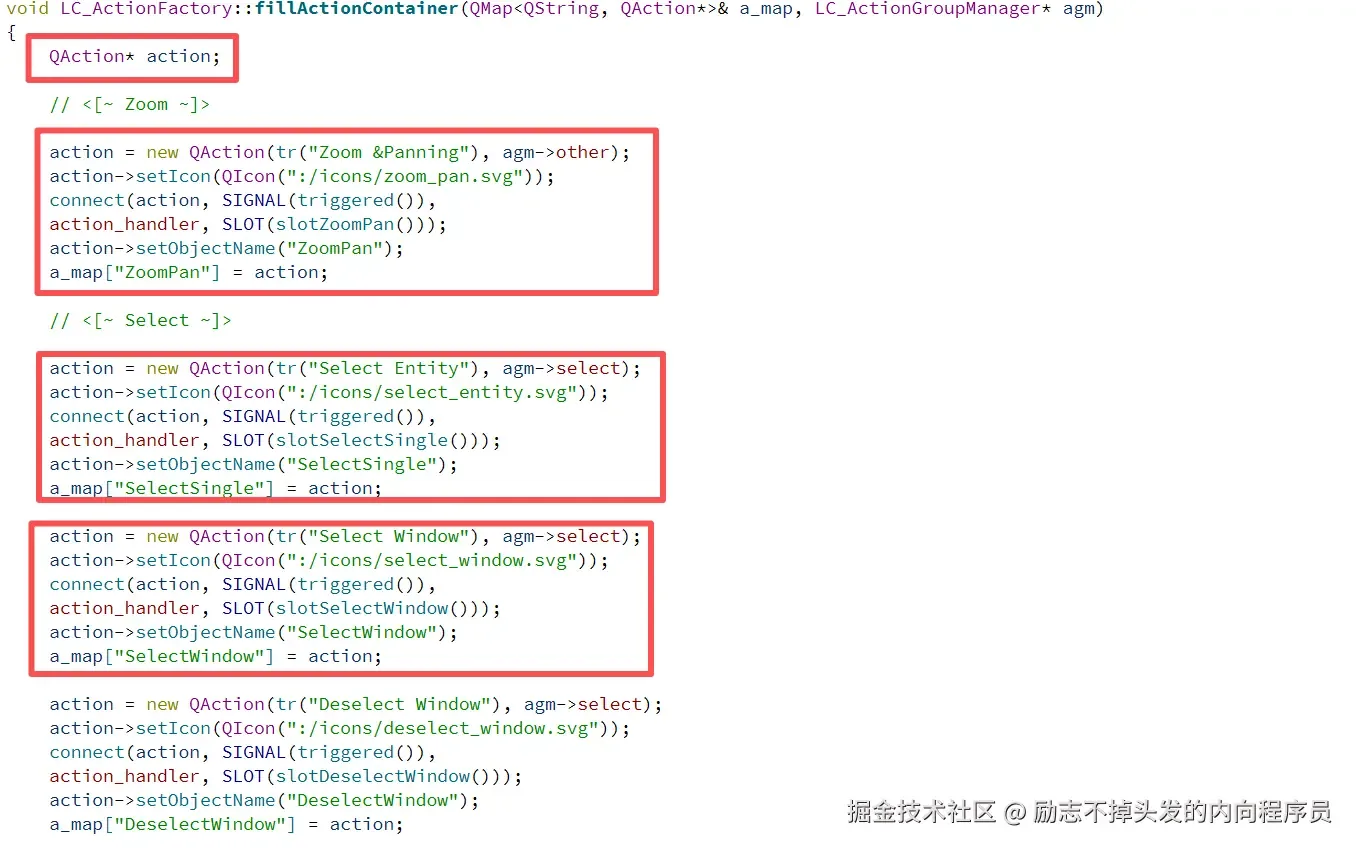
QAction is Qt’s “action descriptor”—not a button itself, but a container holding text, icon, shortcut key, enabled/selected state, and trigger signals. LibreCAD builds its own action system on top:
- a_map mapping table: Maps QString to QAction*, resolving GUI-level action lookup
- agm group management: Organizes related operations (e.g., drawing tools, modification tools) for state switching
- RS2::ActionType enum: Internal action type identifier corresponding to specific RS_ActionXXX classes
When a slot function triggers (e.g., slotZoomPan), setCurrentAction(RS2::ActionZoomPan) invokes the factory pattern: QG_ActionHandler instantiates concrete action objects based on enum values. The surprising detail: a single user click undergoes four abstraction layers—GUI action (QAction) -> type enum -> factory instantiation -> action initialization.
Three: EventHandler and RS_ActionDrawLine Interaction
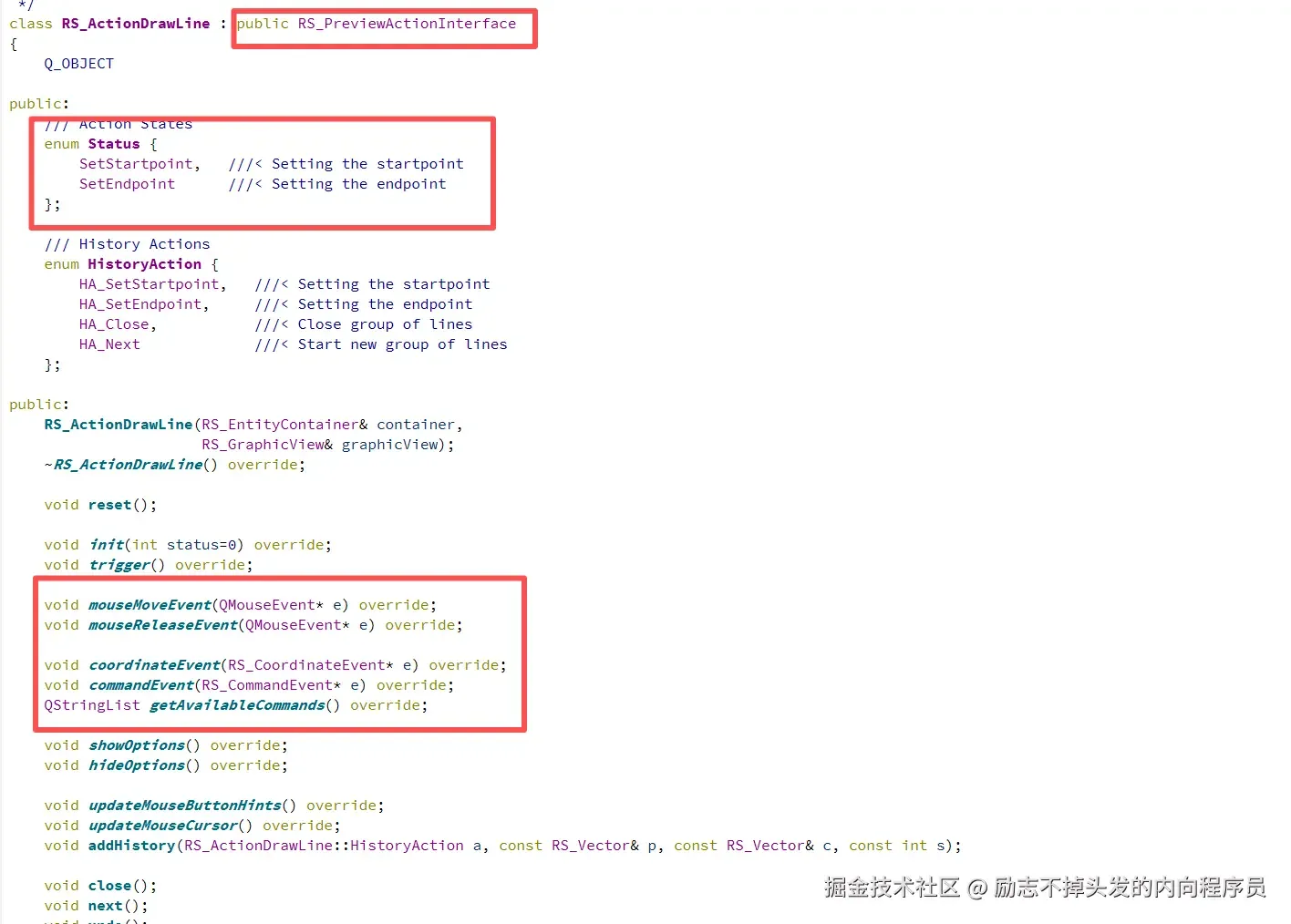
After action creation, the EventHandler takes over. RS_GraphicView passes the action to EventHandler via setCurrentAction, which appends it to currentActions stack and calls init():
| |
For RS_ActionDrawLine, the instantiated object only exists in ‘preparation state’ before init(). After init() is called, it truly enters ‘drawing state’. This class inherits from RS_PreviewActionInterface and overrides mouse move/release events. The critical mechanism: different action classes share the same event interface but implement distinct response logic—a line requires two points, a circle needs center+radius, and copy operations depend on a selection set.
The EventHandler’s responsibility is clear: route input events to the topmost action in the stack for processing.
Four: Architectural Guidance for Developers
This design offers clear value for open-source contributors and custom developers:
- Ideal for frontend developers: Understanding QAction and Qt signals/slots quickly locates GUI interaction entry points
- Essential for core contributors: Mastering ActionFactory and EventHandler patterns enables extension of new drawing commands
- Core advantage: Toolbar, menus, and keyboard shortcuts share one unified logic chain—no duplicate modifications needed across code sections
To add a custom command, developers need only: 1) Define new RS2::ActionType enum; 2) Add factory initialization branch; 3) Ensure new class inherits RS_ActionInterface and implements required events.
Writer’s Note
LibreCAD’s architecture embodies the classic ‘separation of concerns’ principle—GUI layer handles interaction expression, core layer manages geometric modeling. This layering not only reduces coupling but also预留s ample space for future enhancements like script-based drawing or plugin architecture.