The One-Sentence Takeaway: Personal Apps Can Now Be Installed Straight from the Play Store
Google announced on Tuesday a new feature in the U.S.: personal Android apps generated with Google AI Studio can be installed directly through the Google Play Store, without having to connect your phone to a computer for sideloading.
The key facts are as follows:
- Availability: Announced Tuesday; currently for U.S. users, with no timeline given for other regions
- What kinds of apps: Personal Android apps made with Google AI Studio “vibe coding” (describing what you want in natural language and having AI generate the code)
- How to install: Launch or install directly in the Play Store using an ordinary Google account; no professional developer account required
- Will they be public?: No. Google stresses that these apps remain “safe, private, and isolated from the public store catalog”
- What’s next: Google says it will soon add the ability to share apps “with a small group of specified people”
- Price: The original article did not mention fees
The Details: A Path into the Store, but Not onto the Public Shelf
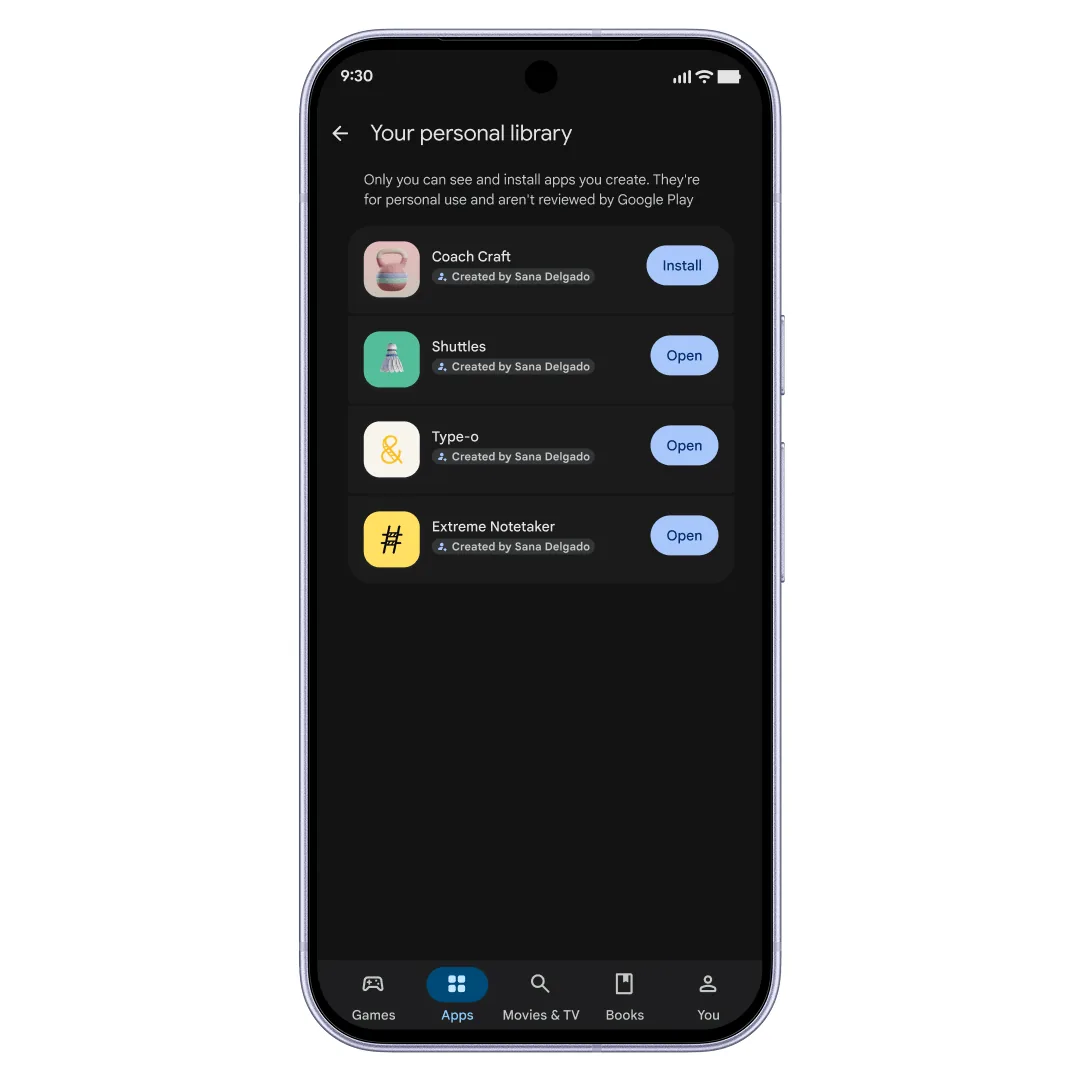
Google first launched the ability to vibe-code personal Android apps in May this year; at the time, to get the finished product onto your phone, you had to connect the device to a computer. The core of this change is moving that final step into the Play Store.
What’s most notable isn’t the convenience itself, but Google’s stance between “isolation” and “funnel-building.” On one hand, these apps don’t enter the public catalog and belong only to their creators, manageable with an ordinary account. On the other, Google Play Vice President and General Manager Sam Bright explicitly wrote in the announcement: if you want to share your app with the world, Google Play will help you “graduate” to a professional developer account, subject to the same trust and safety reviews and high-quality standards as professional developers.
In other words, the personal app section is more like a proving ground—first keeping people who want to build something inside its own store, then moving some of them into the formal developer system. The Play Store here plays two roles at once: a distribution entry point and a preliminary filter.
Where Exactly Was the Barrier Lowered?
In the past, making a small tool for yourself usually wasn’t hard because of “making” it, but because of “installing” it. On Android, the mainstream way to get an app from outside the store onto your phone is sideloading: you need to enable the relevant permissions, connect a data cable, and sometimes use a toolchain on your computer. For people unfamiliar with the command line, that step alone was enough to put them off.
Now the path has been compressed into “tap once in the Play Store.” For people who just want to quickly make a small tool for their own use, this is a real convenience; for people with product ideas who haven’t yet decided whether to register a developer account, it also provides a zero-cost testing ground. Vibe coding is popular precisely because its output is often a one-off small tool, not a product meant to be published on a store.
It’s worth noting that the original article doesn’t explain the review mechanism for this personal app channel in detail, nor does it mention any fees or storage limits; these are still missing pieces of information.
Who Should Use It, and Who Should Wait
- Try it now if: you want to make a small tool or toy for yourself; you’re an aspiring developer with an idea but aren’t ready to register a professional developer account; or you previously gave up on installing something because it required connecting to a computer.
- Consider waiting if: you plan to publish your app publicly or monetize it—personal apps don’t enter the public catalog, so you’ll still need a professional developer account; if you need to reliably distribute an app to a group of people, you might also wait until Google actually ships the “share with a small group of specified people” feature before deciding.
Final Thoughts
What Google has done this time is bring the most off-putting step for AI-generated apps—installation—into its own store. The barrier is lower, and the Play Store has conveniently gained another entry point to its developer funnel. The remaining question is: can this private channel maintain privacy isolation while not leaving people who want to seriously build products stuck halfway?