
Core Event: Open-Source E-Commerce Video Automation Tool Released
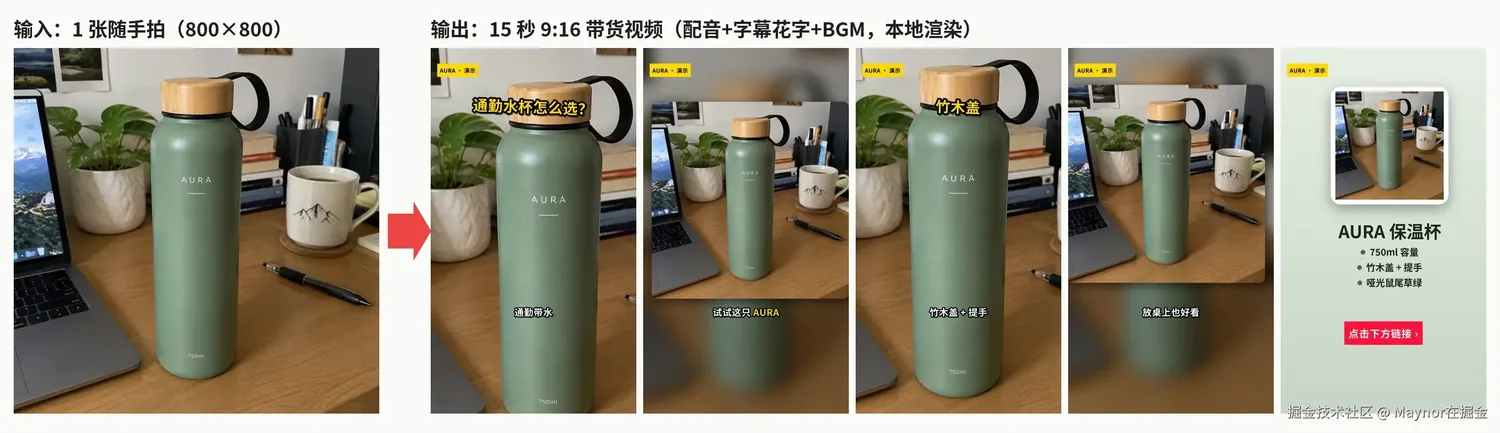
Developer xianyu110 open-sourced ecommerce-video-skills (MIT License), an Agent Skill-based automated workflow for generating complete 1080×1920 vertical e-commerce videos from a single image on a standard Linux machine.
Key Hard Information:
- Installation: Three methods—npx CLI, Claude Code plugin marketplace, or manual copy
- Dependencies: Python (Pillow, NumPy, edge-tts), ffmpeg (with libass), Chinese fonts
- Rendering speed: 27.6 seconds to produce a 14.5-second video on test hardware
- Output: Native 1080×1920/30fps,一键 exporting to Douyin, Xiaohongshu, Taobao specifications
- Loudness: Uniform -14 LUFS, compliant with mainstream short-video platforms
Architecture: The project contains 12 independent Skills (each with SKILL.md documentation). The actual execution—editing, voiceover, subtitles, audio mixing—is handled by Python + ffmpeg scripts, while agents负责 conceptual design (hooks, storyboards, scripts).
Technical Implementation: Five-Step Pipeline from Hook to Final Video
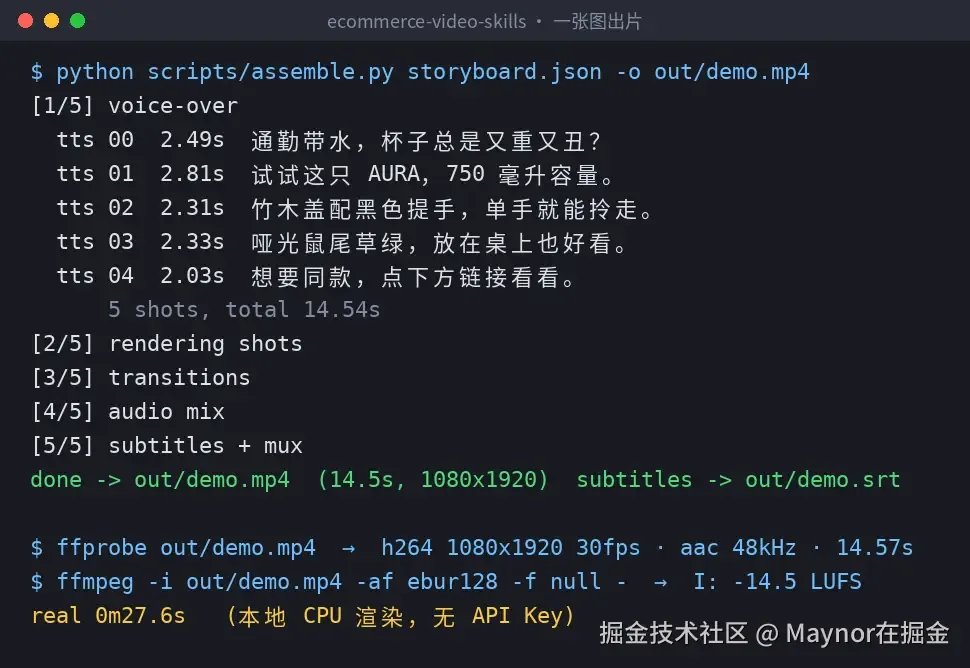
The project decomposes traditional video production into five automated steps:
- Hook Generation: Skills like
hook-3s-scriptprompt agents to generate 9 hook types (pain point question, contrast, result-first, etc.), each ≤18 Chinese characters, automatically filtering banned advertising terms (‘最’, ‘第一’, ‘100%’, etc.) - Storyboarding: Using
selling-point-storyboard, a single image generates multiple shots via different motion/fit parameters. 15-second template: hook → product reveal → facts × 2-3 → CTA - One-Click Output:
assemble.pyexecutes five processing stages: edge-tts voiceover → Ken Burns effect (frame-by-frame scale+crop) → xfade transitions → audio mixing (BGM ducking by 10dB) → subtitle burning & packaging - Platform Export:
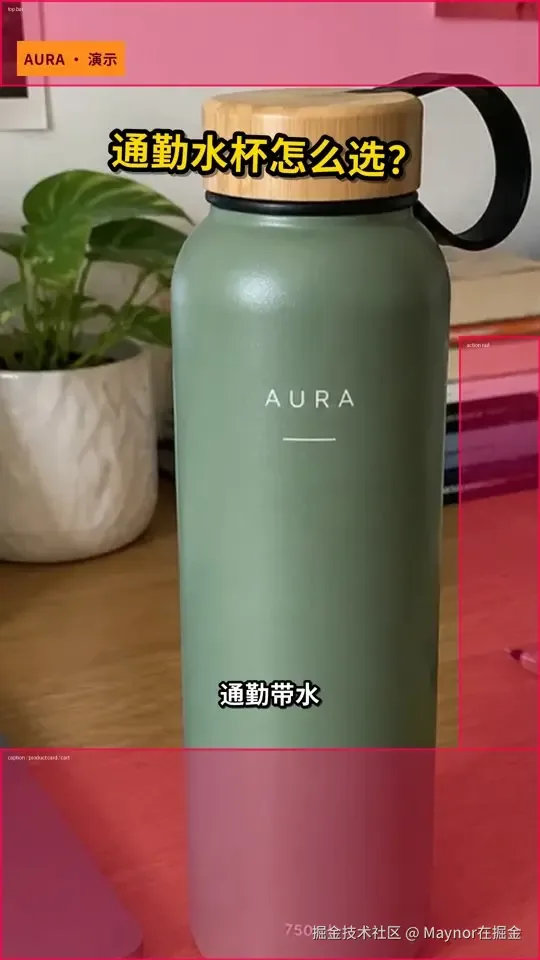
export_platform.pygenerates app-specific formats in one command. Default mode is blur-filling (–mode blur); –safe-preview overlays overlay zones - Cover A/B Testing:
cover_ab.pyuses clean底图 (subtitle-free) from rendering to generate multiple cover variants
Technical Highlights:
- Ken Burns uses frame-by-frame processing for smoother results than ffmpeg’s built-in zoompan
- BGM is real-time generated by
make_bgm.py, no copyright issues - Test performance: 27.6s for 14.57s output, ~10x faster than traditional workflows
Key Data: Single-Image vs Multi-Image Workflows
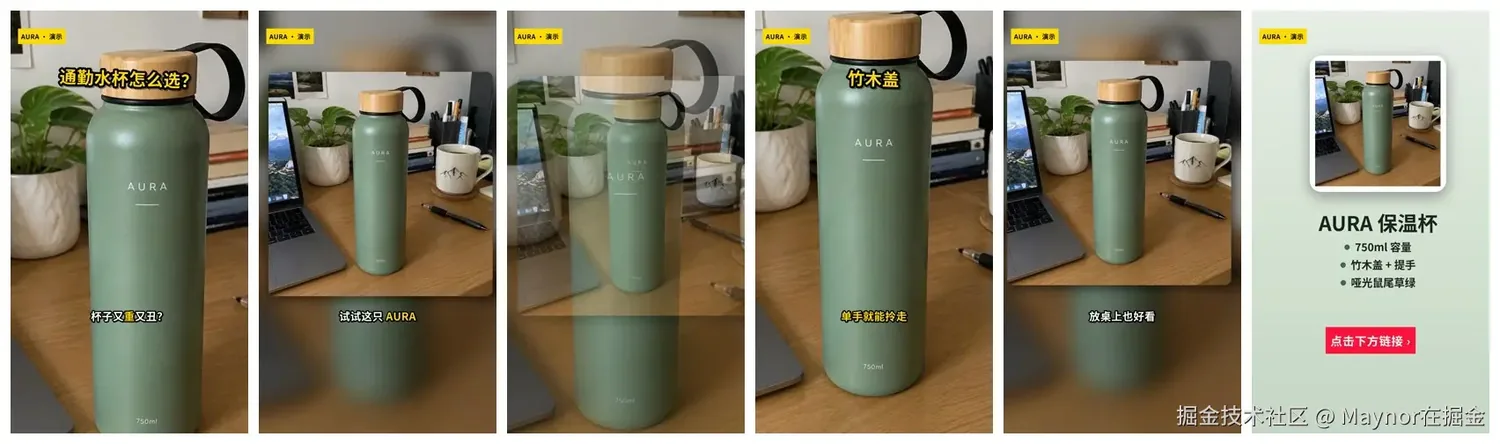
The project specifically addresses the minimal-re素材 scenario—how to create dynamic five-part videos from just one 800×800 desktop photo:
| Shot | image | fit | motion | transition | line |
|---|---|---|---|---|---|
| Hook | assets/photo.webp | cover | punch | slideup | Are your water bottles always too heavy and ugly for commute? |
| Reveal | assets/photo.webp | blur | zoom_in | fade | Try AURA, 750ml capacity. |
| Fact 1 | assets/photo.webp | cover | pan_down | slideleft | Bamboo lid with handle—single-hand portable. |
| Fact 2 | assets/photo.webp | blur | zoom_out | fade | Matte sage green—stylish on any desk. |
| End Card | assets/end-card.png | zoom_in | zoom_in | - | Want the same? Click the link below. |
Notable finding: One commodity image produces four distinct visual effects using different fit parameters (cover=zoom crop, blur=bokeh, pan_down=panning, direct=full frame)—no additional images required for professional-looking shots.
End cards are rendered locally via make_cards.py, with text drawn by PIL to ensure Chinese font clarity.
Note: The demo product “AURA” is an AI-generated hypothetical product;素材 comes from the sister repository ecommerce-image-skills. Voiceover is synthetic via edge-tts. Platform specifications change frequently—always verify against each platform’s official guidelines before upload.
Target Users & Recommendations
Try now:
- Small e-commerce sellers: Have product images but no editing skills; use hook-3s-script for quick A/B test storyboard variants
- Content creators: Need frequent template-based video output; supports multilingual (adjust –lang/voice only)
Wait longer:
- Brand-side teams with high creative requirements: Scripts depend on accurate agent fact extraction; the core rule remains ‘no claim without visible proof’—untested specs (e.g.,保cold duration) shouldn’t appear in voiceover
- Projects requiring complex motion: Ken Burns provides static dolly/zoom; for real movement, integrate image-to-video models (Seedance/KeLing/Veo/Runway)
Final Thoughts
The project’s value is automating the repetitive, deterministic环节: editing rules standardized as JSON, platform adapters as CLI commands, voiceover/subtitles by scripts. But creative control and factual accuracy remain human responsibilities—fairly representing the ‘human-in-the-loop’ boundary the author repeatedly emphasizes.