
AI Browsers Are No Longer Just a “Search Box”

Mozilla is adding more practically useful capabilities to Firefox’s Smart Window AI browsing mode. Starting now, the AI chat in Smart Window can pull live web information through a partnership with Exa and display source links in its responses. It can also search a user’s browsing history using natural language to rediscover previously visited pages, and automatically suggest tab groupings.
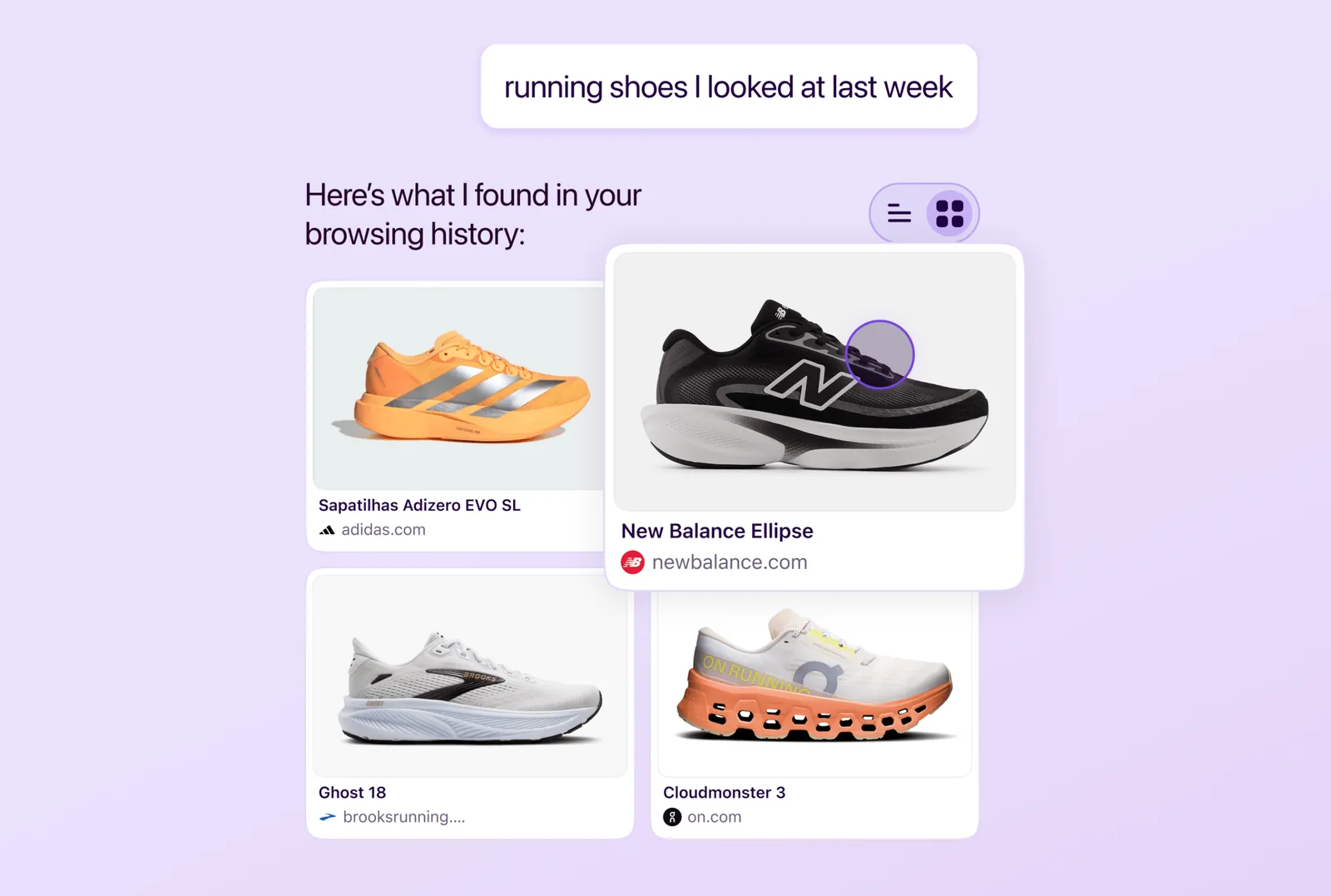
The core of this update isn’t about turning the browser into yet another chatbot. Instead, it targets two high-frequency pain points in the browsing experience: finding content you’ve seen but forgotten the URL to, and organizing an ever-growing number of tabs. In a live demo seen by The Verge, Smart Window could filter through a user’s browsing history based on natural language queries like “running shoes I looked at last week,” displaying image previews from previously visited sites. For users who remember what was on a page but not the specific site or title, this kind of retrieval feels far closer to how human memory actually works compared to traditional history search.
New Capabilities: Citations, Previews, and Tab Organization

This Smart Window update primarily introduces three categories of features.
- Live web answers with source links: The AI chat can leverage current web information provided by Exa and include citations in its responses, making it easy for users to verify.
- Natural language history search: Users can search their browsing history using conversational descriptions, with the system displaying visual previews of previously visited pages.
- Tab grouping suggestions: Smart Window can automatically suggest groupings, detect and close duplicate tabs, and help users keep important pages within reach.
Here, “natural language” means users don’t need to enter precise keywords—they can express what they need in everyday language, such as describing the general content of a page. Compared to traditional browser history, which relies on matching URLs, titles, and keywords, the AI mode places greater emphasis on semantic understanding. However, Mozilla’s announcement also focuses on “reclaiming context”: when users remember what was on a page but forgot where they saw it, Smart Window helps them pick up the thread. Mozilla says beta user feedback indicates this helps maintain continuity of thought while browsing.
Looking ahead, Mozilla also plans to add a browsing journey presentation similar to what Chrome recently introduced, as well as AI-powered autofill for online forms. The original announcement did not disclose specific launch timelines or implementation details for these future features.
Still in Beta, AI Is Opt-In
Smart Window currently remains a beta feature that users must actively enable. Firefox executive Ajit Varma told The Verge that Mozilla has not yet determined when it will graduate from beta. The feature was originally announced last year under the name “AI Window,” positioned as an AI browsing mode within Firefox that supported natural language search across open tabs and browsing history.
Unlike some approaches that deeply embed AI into the product workflow, Mozilla emphasizes that Smart Window will not “take over” the browser. Firefox settings now include a dedicated AI Controls section where users can turn off all AI features entirely or selectively choose which capabilities to keep. Varma described this strategy as a more “neutral” AI path: Mozilla wants to provide an entry point for those who want AI, without forcing the same experience on all users.
Optionality is also a key design principle of Smart Window. Users can choose from different AI models, including Google’s Gemini 3.1 Flash Lite, OpenAI’s oss-gpt-120b, Alibaba’s Qwen3-235B-A22B-Instruct-2507, or their own local AI models. Varma also raised the possibility of “digital sovereignty”: users can opt for local models, or choose AI service providers from specific regions with different philosophies.
Privacy Promises Take Center Stage

In the AI browser competition, privacy and data handling are becoming just as important as features. Firefox AI Senior Product Manager Steve Truong stated that when Mozilla partners with third-party models or API services, it enforces “zero data retention” contracts: the other party processes user prompts in memory only, and does not store data for model training, advertising support, or human review. He also stated that Mozilla itself will not save user chats on its servers without user consent for purposes of model training, human review, or advertising.
These statements continue Firefox’s long-standing brand emphasis on privacy and open choice. The difference is that AI features inherently require processing user intent, page context, and browsing history, making users more sensitive about where their data goes. Whether Smart Window can earn trust, therefore, depends not only on how smart its answers are, but also on whether control switches are clear, whether model choices are genuinely usable, and whether source citations let users verify results.
Commentary: The AI Browser Battle Will Be Won on “Integration,” Not “Replacement”
From this update, it’s clear Mozilla isn’t positioning Smart Window as a standalone AI entry point. Instead, it’s trying to weave AI into the browser’s existing tasks: searching, organizing, and returning to context. For everyday users, this is more practically valuable than simply adding a sidebar chat box. The next phase of AI browser competition may not be about who can generate longer responses, but about who can reduce information management overhead without disrupting user habits.
That said, Smart Window is still in beta, and the actual experience needs to be validated by users. Live web answers, history search, automatic grouping, and form autofill all involve accuracy and privacy boundary questions. Mozilla’s advantage is its emphasis on choice and transparent control; its challenge is proving that these features genuinely make Firefox better—without forcing users to adopt AI. If Smart Window continues to improve around “what users are already doing in the browser” rather than transforming the browser into a chat platform, it may offer a more sustainable path forward for AI browsers.