
How It Started: Changed It Three Times, Nothing Changed
In ccswitch (v3.19.2, a Claude Code config switching tool for Windows), I clicked “Edit Provider,” changed the model for the Opus tier, and saved. Switched back to Claude Code, restarted—it was still running the original model. Changed again, saved again, restarted again—still no change.
“Can’t change it” is the kind of problem where blind guessing is your worst enemy. What follows is a field-by-field comparison using logs and the database, working step by step toward the root cause. The conclusion turned out to be far more convoluted than intuition suggested—the writes were succeeding; the problem was a combination of three separate factors.
First, Eliminating the Two Most Likely Suspects
Suspect one: Write failure (atomic write os error 50). Writing to the Windows side from WSL2 via the 9P bridge has historically rejected rename operations with os error 50. But I checked the modification time of ~/.claude/settings.json—it had just been written successfully. ccswitch’s own database was also written in the same second, with a pre-switch backup. The write path was working fine. Ruled out.
Suspect two: WSL and Windows have two separate files. Inspection revealed that ~/.claude/settings.json is a symlink pointing to the same file on the Windows side. What ccswitch writes on the Windows end is exactly what Claude Code reads in WSL—one and the same file. Ruled out.
Falsifying these two first saves a huge amount of thrashing in the wrong direction. This is also the first step in troubleshooting any “changes didn’t take effect” problem: confirm whether the write actually succeeded before you start fixing things that aren’t broken.
Real Root Cause One: Three-Layer Model Override
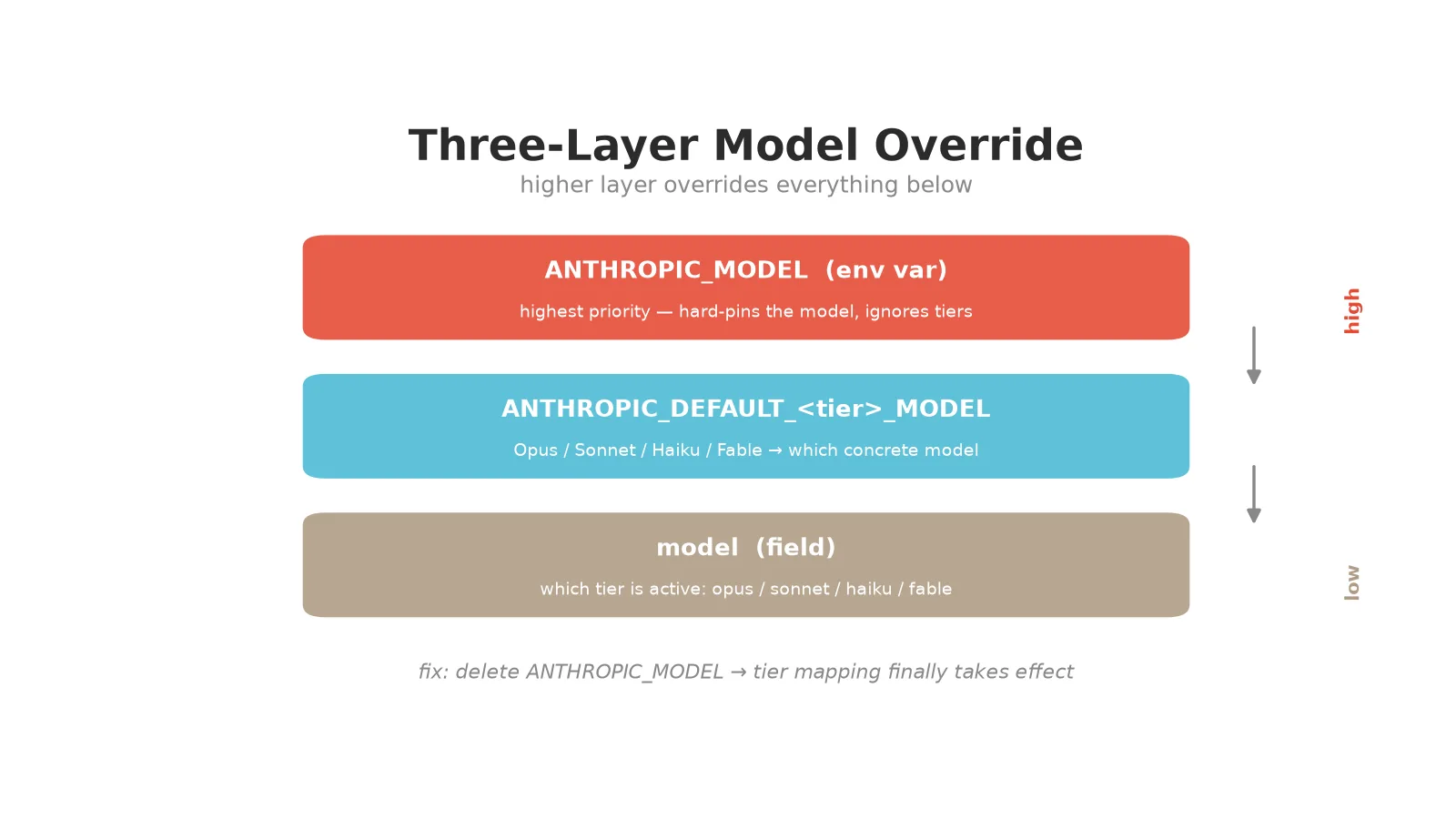
When Claude Code decides “which model to actually run,” it doesn’t look at a single field. Three layers stack on top of each other, with priority from highest to lowest:
ANTHROPIC_MODELenvironment variable—highest priority. Once set, it forces the entire session to run this model, overriding the two layers below.ANTHROPIC_DEFAULT_<tier>_MODEL—“which specific model the Opus/Sonnet/Haiku/Fable tier maps to.”modelfield—which tier is currently selected (opus/sonnet/haiku/fable).
My config had all three layers fighting each other: model: "opus" (selecting the Opus tier), the Opus tier mapped to model A, but ANTHROPIC_MODEL was hard-pinned to model B. The highest-priority layer压制 everything below—no matter whether you changed the Opus tier mapping or switched the model field to a different tier, it would always run model B in practice.
This is the first layer of “changed it but nothing happened”: you thought you were changing the tier mapping, but the hard pin was overriding it—the tier mapping never got a word in.
Real Root Cause Two: ccswitch’s “Edit” and “Apply” Are Two Separate Actions
This was forced out by the logs. ccswitch’s logs only recorded the following within this operation’s time window:
| |
In other words, the “click edit, change model, save” action only wrote to ccswitch’s own database providers table (the template update succeeded, even triggering cloud sync), but it does not push the new template to the .claude/settings.json that Claude Code actually reads. To push to live, you need to separately click “Switch/Apply Provider.” ccswitch also only does a reverse check at startup (whether to backfill from live into the database)—it never proactively pushes the database to live.
So: your edit took effect in the database, but the live file didn’t budge—Claude Code was still reading the old values. This is the second layer of the cause: you did “edit,” but never did “apply.”
Real Root Cause Three: Drift Between the Database Template and the Live File
Pulling the template for this provider from the database and the actual values from the live file for a field-by-field comparison, all four tier mappings were off by one position:
| Tier / Field | Database Template (after edit) | Live File (actually running) |
|---|---|---|
| Opus tier | qwen3.8-max | glm-5.2-fast-preview |
| Sonnet tier | glm-5.2-fast-preview | deepseek-v4-flash-0731 |
| Fable tier | deepseek-v4-flash-0731 | qwen3.8-max |
ANTHROPIC_MODEL | glm-5.2-fast-preview | qwen3.8-max |

This isn’t one field being wrong—it’s multiple database edits accumulating while live stayed parked at an old switch point, and the two drifted further apart. Even if you go back and click “Switch” to make ccswitch push live, what it pushes is this misaligned template, and things would still be messed up. Additionally, the database template only contains the env block—it doesn’t include the top-level model and effortLevel fields. This is by design in ccswitch, but it does make “fully managing models through ccswitch” awkward.
The Fix: Remove the Hard Pin, Let Tiers Do the Talking
Minimal fix: delete the ANTHROPIC_MODEL hard pin, the highest-priority override. Once removed, the chain model field selects tier → tier mapping → actual model finally works end to end. Combined with a straightened-out tier mapping (Opus=workhorse, Sonnet=hard tasks, Haiku=light work, Fable=max quality), removing the hard pin lets the tier division of labor actually take effect.
After making changes, you must restart Claude Code—env vars are injected into the process at startup; modifying the file doesn’t affect an already-running session. The current session still holds the old values—you need to fully exit and reopen to pick up the new config.
Verification: after restarting, use /model to switch to the Sonnet tier and check whether the actual model changed to the one mapped for Sonnet. If it did, the tier mapping chain is confirmed working.
Going Forward: Skip ccswitch, Edit settings.json Directly
Once the diagnosis was clear, the most hassle-free path turned out to be the most plain one: don’t use ccswitch day-to-day—just edit ~/.claude/settings.json directly. Because the only reason for the “can’t change it” problem was that ccswitch’s switch operation overwrites the live file with a stale database template; if you don’t touch it, that overwrite path doesn’t exist, and settings.json becomes your single source of truth.
The one iron rule: don’t open ccswitch and click “Switch/Apply Provider” ever again. One click triggers a full-block overwrite (misaligned tier mappings, hard pins, missing keys—all come back). Leave it alone, and after editing you just need to restart. For daily tier switching, Claude Code’s built-in /model command works too—it essentially modifies the model field in settings.json, and under the premise of “not using ccswitch,” it’s equally persistent.
Honest Boundaries
- The priority ordering of the three-layer override is based on static inference corroborated by system echo (“settings.json pins X — applies on restart”). I did not do a field-by-field empirical test of which layer ultimately wins after restart—that part is left for you to verify on your own restart.
- The conclusions apply to ccswitch v3.19.2. On the day of writing, a v3.20.0 update was detected; whether it fixes the “edit doesn’t push to live” behavior is unknown.
settings.local.jsontakes priority oversettings.json. If the local file also sets the same model fields, it will override settings.json—don’t forget to check local during troubleshooting.
How to Reproduce This Diagnosis Yourself
Reproducing this diagnosis comes down to four commands (replace paths and keys with your own):
| |
Compare the template from command three with the live values from command two, field by field—any mismatches are drift points. If the logs from command four show no “apply to live”-type event, that confirms “edit doesn’t push to live.”
Troubleshooting any “config change didn’t take effect” problem follows the same general approach: light up every segment of the data flow—did the write go through? Is what’s written the same thing being read? When reading, which layer has the highest priority and overrode the one you changed? Walk through those three steps, and the root cause surfaces on its own.